AinTunes



Streaming Assets で iOSとAndroidの違いにハマったのでメモ。
string FilePath;
#if UNITY_IPHONE
  FilePath = Application.dataPath + "/Raw/" + filename;
#else
  string fullPath = "jar:file://" + Application.dataPath + "/!/assets/" + filename;
  WWW www = new WWW (fullPath);
    while (!www.isDone) {
  }
  FilePath = Application.persistentDataPath + filename;
  File.WriteAllBytes (toPath,www.bytes);
#endif
iOSはそのままパスからファイル読み込みできるけど、Androidは一度Application.persistentDataPathにコピーしてから開かないといけない。
メッシュの情報をとる方法に少しハマったので備忘録
ローカル座標ではmeshfilter.mesh.boundsではなくてrenderer.boundsという話。
別のプロジェクトで作ったものを、いったん.unitypackageでエキスポートしたのですが、インポートすると、エディタでは問題なく動くのに、実機転送すると動かなくなる現象があり、むちゃくちゃハマりました。
むちゃくちゃ簡単
ffmpeg -i movie.mp4 -s 1136x640 movie.mp4
UnityのlookAtは便利ですが、回転をさらに細かく制御しようと思うと難しいので置き換えます。
Rot.transform.LookAt (Vector3.zero);
こうするところを、
Vector3 relative = gameObject.transform.InverseTransformPoint(Vector3.zero);<br />
float angle = Mathf.Atan2(relative.x, relative.z) * Mathf.Rad2Deg;<br />
Rot.transform.localRotation = Quaternion.Euler(0,angle - 90.0f, 0);
こうしてあげると、Vector3.zeroをむきつつ90.0度Y軸回転をできます
<script type="text/javascript">

var client_id = "クライアントID";
var scopes = 'https://www.googleapis.com/auth/drive';

function checkAuth() {
	gapi.auth.authorize(
	{
	    'client_id':client_id,
	    'scope':scopes,
	    'immediate':true
	},
	function(authResult){
		console.log(arguments);
	});
}
</script>
<script type="text/javascript" src="https://apis.google.com/js/client.js?onload=checkAuth"</script>
こんな感じで認証部分を記述しても何度やってもこのエラーが。。
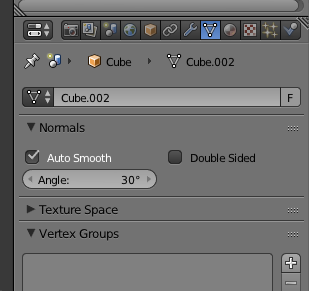
Auto SmoothをON
3DViewでモデルを選択し、Object ModeからEdit Modeに変更。
左側のメニュー内のShading/UVsを選択。
Shading/UVs > UVs > UV Mapping > Unwrap のドロップダウンメニューでUV展開の方法を選択。
画面下のメニューのUVsから UVs > Export UV Layout で画像を保存。
先週の「RingNinja」に続いて、GearVR向けのVRシューティングゲーム「GCLOPS」がOculus Storeのギャラリーアプリで公開されました。Oculus Store